
BlankOn X Tambora Review : Fast and Gorgeous

BlankOn is an Indonesian, Debian based Linux distribution. In January 2017, BlankOn development team has released its newest version BlankOn Linux X (10) codenamed “Tambora” (which is a name of a volcano in Indonesia).

1. Overview
BlankOn Linux X Tambora uses Linux kernel 4.6.0-1. Not like other recent Linux distributions today, BlankOn X Tambora supports both 32bit and 64bit architecture. It is really a very good decision to keep the 32bit support, because there are many Linux users who still use an old computer with slow CPU and small amount of memory.
BlankOn Linux X Tambora with Manokwari Desktop

2. Manokwari Desktop
BlankOn has a custom desktop shell called Manokwari, built on the top of GNOME. It’s a gorgeous, simple and really fast desktop. BlankOn X Tambora uses GNOME component version 3.20.1.

Manokwari has 5 important elements : 

Left Panel
When you click the left top corner at the distribution logo, an elegenat drop-down traditional menu will appear. There is a search bar in the menu so you could find an app shortcut by typing. Personally, I love this elegant & fast traditional menu.


Task Bar
Beside distribution logo, there is a simple task bar with tiny icons of the applications running. If the pointer hovered at the task bar, a preview will appear similar to GNOME shell task bar.

Indicators
At the right top corner, there are Indicator applets : network indicator, sound indicator, input indicator, application indicator, and virtual desktop indicator.


Right Panel
If you hover at the right top corner, a complete, elegant setting shortcuts will appear. The menu will remind you to the very similar menu of Deepin Linux. In fact, no doubt it is the exact same menu which Deepin Linux has. 


Applications Dock
At the bottom you will find a very nice and very simple dock. If you right click an app shortcut from the left panel drop-down menu, and you click ‘Add to desktop’, the app shortcut will be put in the dock.


3. Resource Utilization
BlankOn Linux X Tambora utilizes about 700-800 MB of memory in the idle time. Ran in my Intel dual core 1,6 Ghz with 4 GB of memory, BlankOn Linux runs very well and the desktop overall runs fast.

4. Installation
BlankOn Linux has a live installer with very simple option. You’ll only find a choice to install the system into a specific partition. There is an advanced option, but still, the option doesn’t provide advanced partitioning like in Ubuntu’s or Debian’s Installer.

If you don’t have a specific partition yet, you have to make it first by using partition manager like gparted.


5. Themes
BlankOn X Tambora uses a modified version of Arc GTK theme which looks gorgeous. Paired with a nice icon theme called Tebu, I love the overall BlankOn X’s artwork. Very nice job for the BlankOn’s artwork team. BlankOn X Tambora also has an elegant shutdown dialog.
Tebu Icon Theme
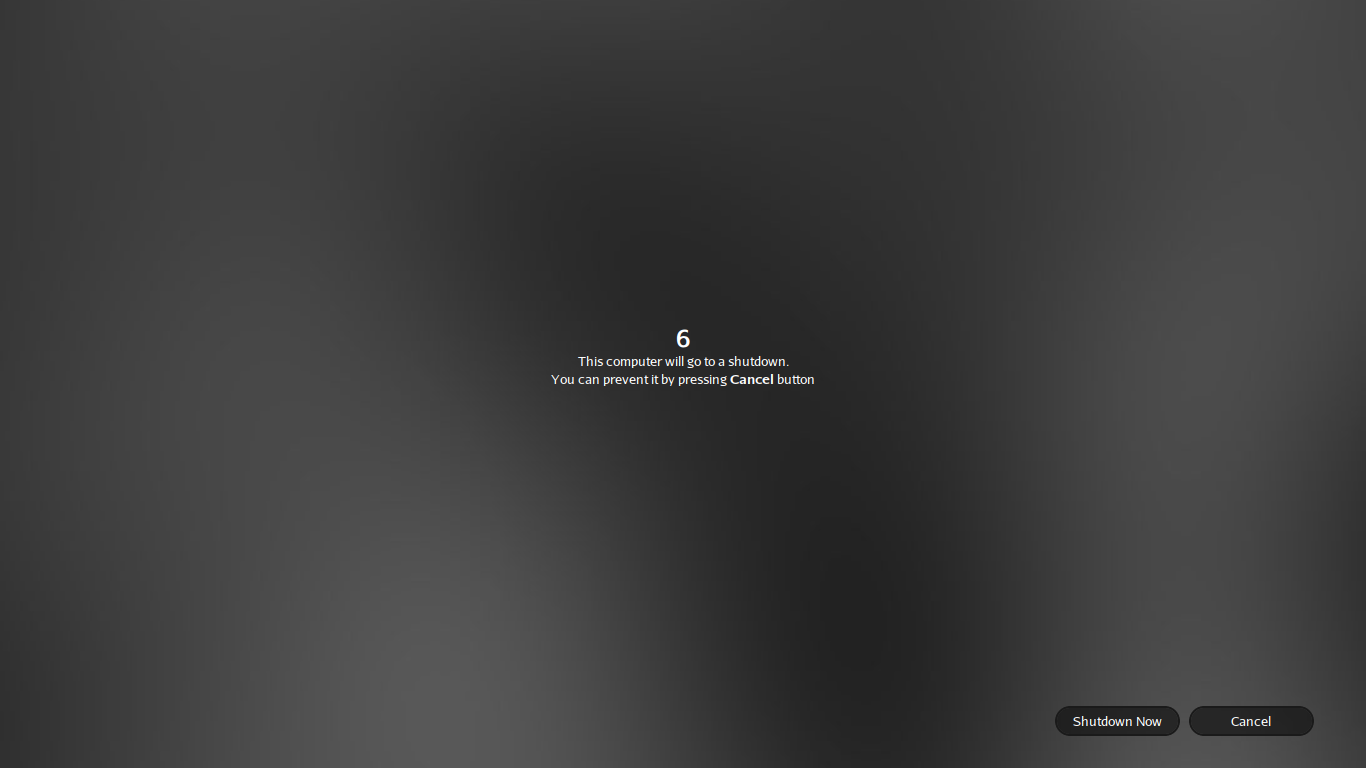
A good looking Shutdown dialog
6. Conclusion
BlankOn X Tambora provides you a good and fast desktop called Manokwari. It’s very easy to understand and very easy to use. If you are looking for a fast and beautiful, alternative Linux distribution, BlankOn X Tambora is perhaps your perfect Linux distribution you've been searching. 

These are my personal scores to BlankOn X Tambora :
- Build Quality : 8/10
- Desktop : 9/10
- Artwork : 9/10
- Resource Utilization : 7,5/10
- Installation : 5/10
- Overall score : 8/10

Comments

Does anyone know what is the default administrator password for BlankOn Tambora's Live Version? Can we save updates if we have installed the this live version on a USB Pendrive? Because I "think" the settings won't get save once you logout of "Live" version, is it so?

Popular posts from this blog

Ubuntu Kylin 19.04 Review : A Gorgeous Windows 10 Clone

It's been quite a while since the last post I wrote in this blog. My daily life prevents me to write another stuff about Linux Desktop, and now I'm curious to take a look to the Ubuntu Kylin 19.04. Ubuntu is always be my favorite distro. It supports huge number of hardwares, it has probably the largest Linux software repository. It is also --the most important thing-- very easy to install, even for beginners.  But for some couple of years, because of technical reason, I stopped to play around with the Ubuntu releases. I stood for KDE Neon and became my primary OS because of its simplicity and the look. Few days ago Ubuntu has released its newer version, Ubuntu 19.04 codenamed Disco Dingo. I'm yes impressed by the progress Ubuntu developer has made, especially the way they arrange the GNOME desktop to match the Ubuntu theme. But the most interesting flavor of this release is Ubuntu Kylin. It's an official Ubuntu flavor, designed for Chinese People with its own...

How To Speed Up Your KDE Plasma Desktop (KDE4)

KDE is one of the oldest desktop environment in Linux. While GNOME (the other desktop that as old as KDE) is trying to built its own style of user interface, KDE from the beginning seems to mimics the Microsoft Windows' "classic" user interface. Thus, KDE has its own user base, especially for them who still in love with the Windows' philosophy : a simple desktop, with a single taskbar in the bottom, and a start menu in the left. Personally, I love KDE. It's gorgeous and eyecandy. But sometimes, I feel KDE is little bit slow in my older hardwares. So, after some experiences, I've found some tweak how to make KDE Plasma Desktop Runs Faster . 1. Change The Compositing Engine  Go to System Settings>Desktop Effect>Advanced , and change the Compositing type from OpenGL 2.0 to XRender. 2. Remove All Bloatware Apps There are some uneeded apps installed in Kubuntu (my favorite KDE distro) and you could safely remove them. Here are my list : ...

Q4OS 4.6 "Gemini" Review: A Real Hidden Gem

Distro hopping is a fun adventure. It's a pure joy you can only find in GNU/Linux world. It's a nature you want to escape from what I call 'comfort ecosystem'. You need to play, trying something new even for a few little differences. For a long time I've been using Ubuntu family as my daily driver. The main reason is probably just same as any other Ubuntu user: it's reliable. You can't go wrong with Ubuntu. It works almost in any device, even for the newest one. It is the ultimate Linux distro you can rely on. However, sometimes, you will feel bored. The temptation to flirt with other new distro is unbearable. There are a lot of hot new Linux distros waiting to try.  A Real Hidden Gem I've known this distro for a quite long time. At first, it offered Trinity Desktop as the main desktop, which brings me the sweet memories about KDE3. It is simply fast, stable, almost without any issue, and it is based on Debian. I install it on my old machine and I love t...